
Writecream Review: Can This AI Content Generator Replace Your Writing Tools?
If you've ever wished for an AI tool that could help you write blog posts, create images, generate social media captions, and even assist with SEO, then Writecream might be worth exploring.
I've spent about two hours a day using Writecream to test out its different features as both a blogger and an AI content enthusiast.
While I'm not from a technical background, I've reviewed several similar tools like NeuronWriter and WordHero.
In this review, I'll walk you through what Writecream actually does, how well it performs, and whether it could be the right content creation tool for your needs.
🗝️ Key Features
Long-form content editor
Social media, ad copy, cold email, and product review generators
AI image generation and stock photo integration
SEO hub for keyword, backlink, and competitor analysis
Chat Genie for brainstorming, translation, and tone adjustments
Backlink Autopilot for natural link building and improved SEO
🎯 Why It’s Useful
All-in-one solution for bloggers and content creators
No need to juggle multiple subscriptions
Helpful for idea generation, SEO optimization, and writing structure
💵 Pricing
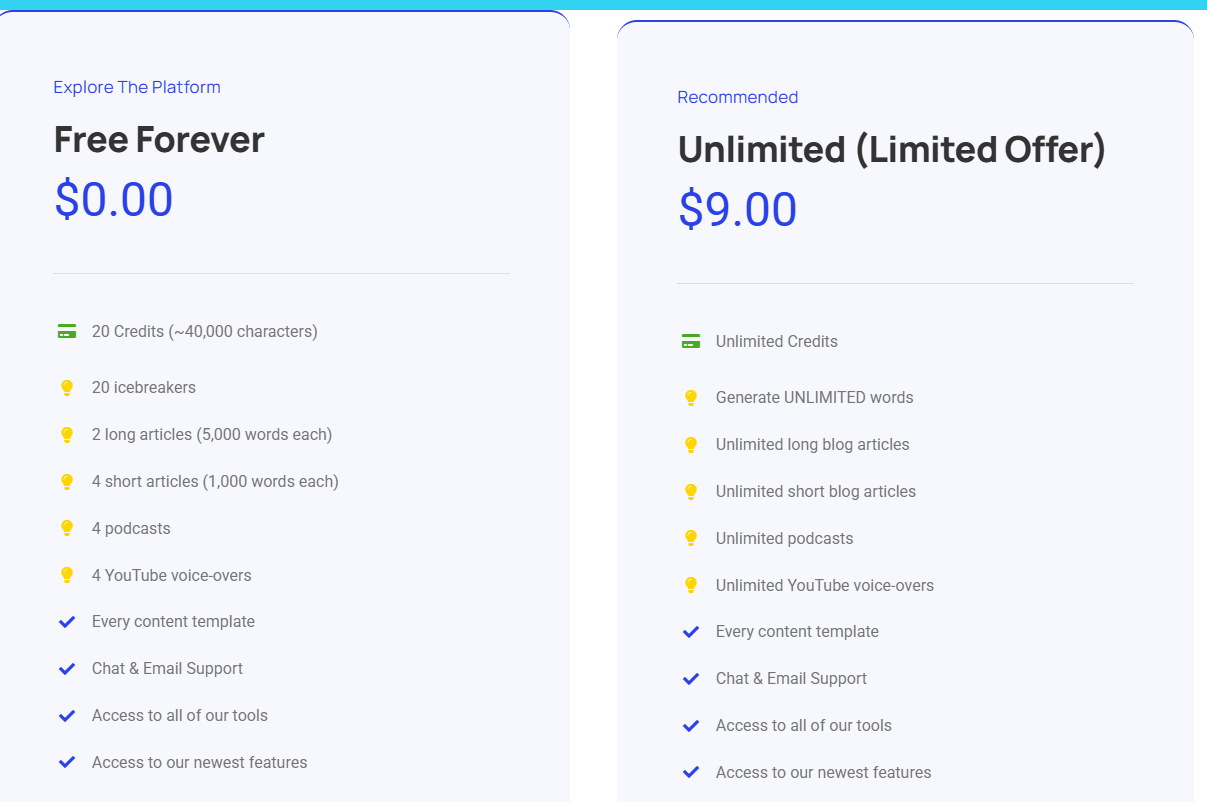
Free plan available with 40,000 characters/month
$9/month for full access
Lifetime deal available on AppSumo ($59 one-time)
What Exactly Is Writecream and How Can It Benefit You?
Writecream is an AI-powered content creation tool, copywriting assistant, and content generator designed to help you produce high-quality written content quickly and easily.
Personally, I use Writecream to kickstart my writing process, mainly to build out the framework for blog posts or articles I plan to publish.
From there, I refine and rewrite the AI-generated content in my own words and voice.
This saves me a lot of time, especially when it comes to building outlines, finding the right keywords, and optimizing the content for SEO, all within the Writecream dashboard.
How to Use Writecream to Create Content Fast
To get started:
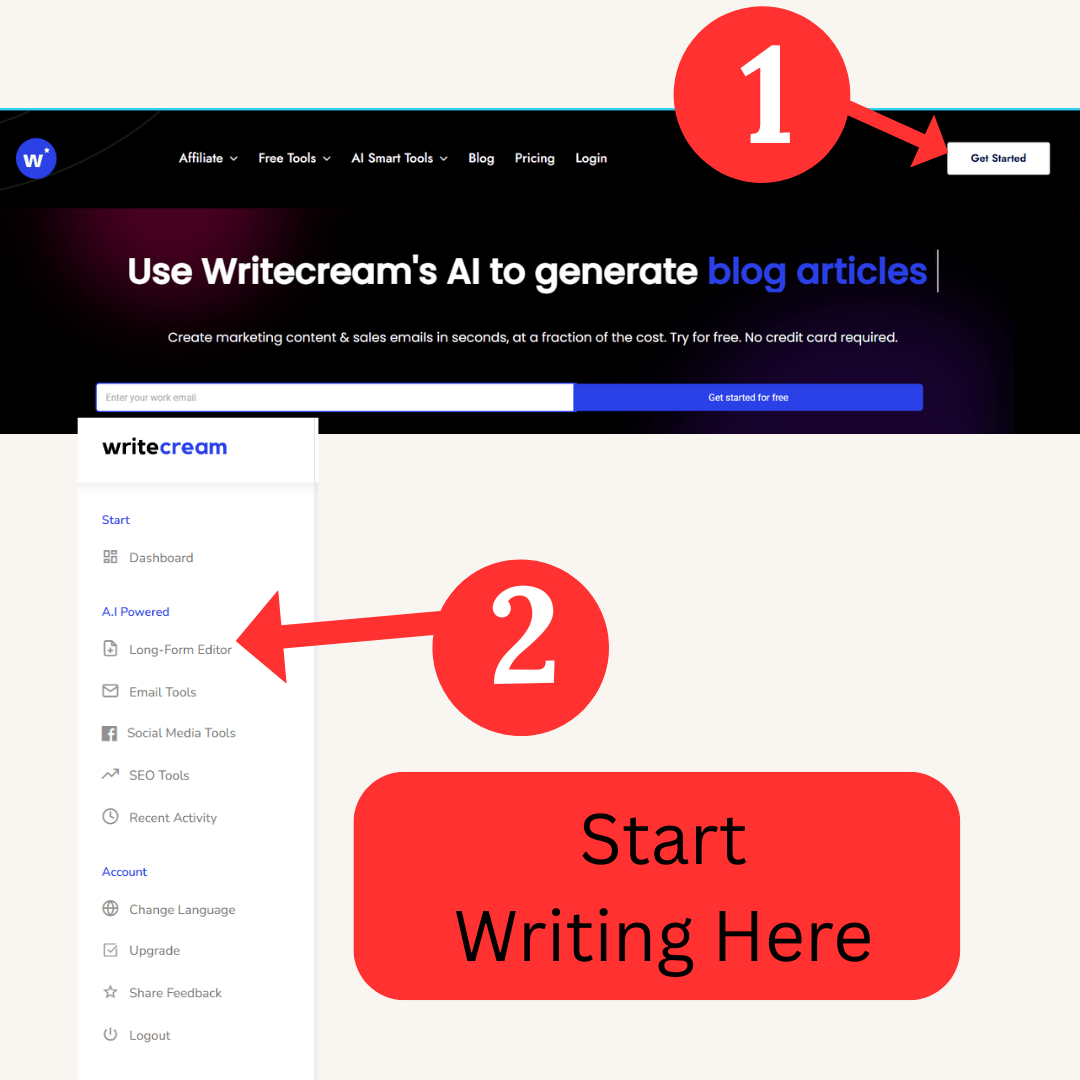
Step 1. Visit Writecream.com and click on Get Started for Free.
Step 2. Look for the pop-up offering 10,000 free words per month. Enter your name and email to claim your free access.
Step 3. After signing up, you'll be directed to your Dashboard, where you can explore Writecream's tools.
Setting Up Your First Blog Article:
1. Click on Long Form Editor from the left-hand menu.
2. Select New Research to begin a new project.
3. Enter your target keyword or topic in the search field.
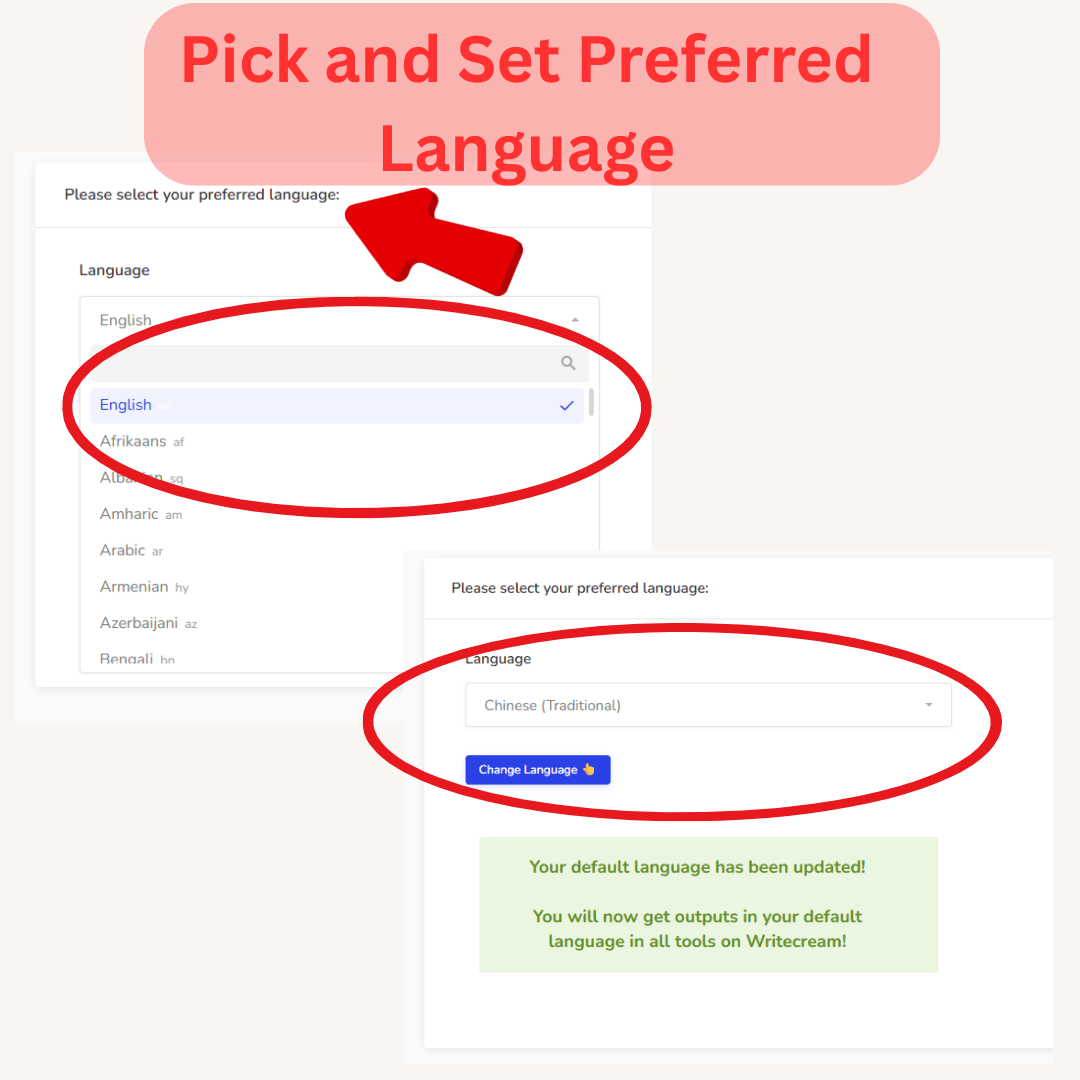
4, Choose your country and preferred language.
5, Click Start — Writecream will guide you through the content generation process.
6. Follow the prompts to create a structured blog post with H1, H2, and meta content in just a few minutes.
Using the Long-Form Generator and SEO Tools:
Once your article is generated and edited, use Writecream's SEO tools to:
Discover keyword ideas
Analyze competitor content
Add meta descriptions and conclusions tailored for SEO
You'll also find helpful insights on user intent, making it easier to write content that meets your readers' needs.

Who Should Use Writecream AI Writing Tool?
Writecream is ideal for:
Bloggers and content creators who need help generating ideas and long-form content
Marketers and small business owners writing product descriptions, ad copy, or emails
Social media managers creating captions or posts that engage
Students and professionals working on essays, speeches, or reports
Non-techies looking for an all-in-one content creation platform
It also includes helpful tools like a chatbot, SEO editor, grammar and plagiarism checkers (manual use), and Quora answer assistance.
Writecream Features That Set It Apart from Other AI Writing Tools
🧰 Highlight Features at a Glance
Long-Form Editor – Quickly generates structured articles with keyword-rich headings
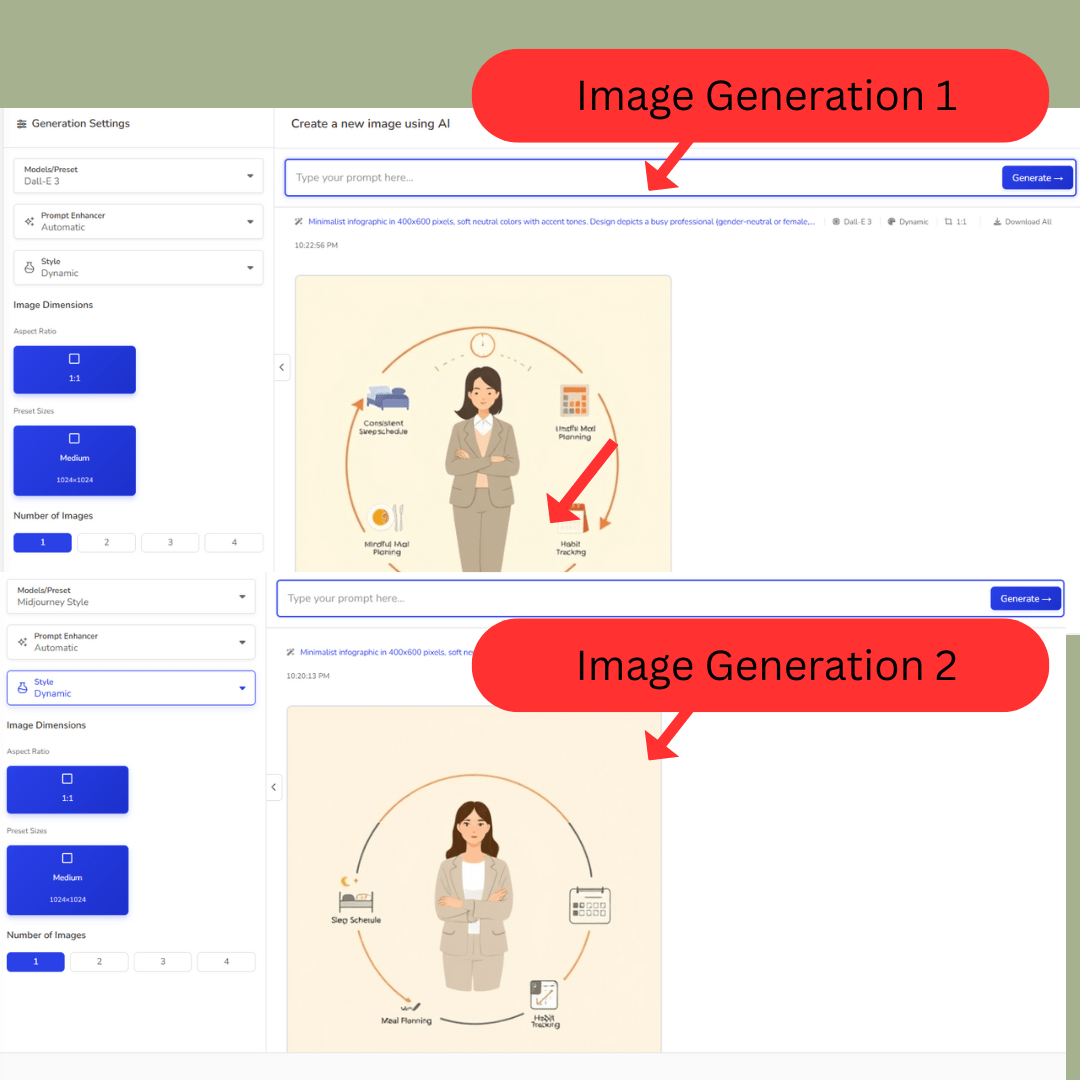
AI Image Generator – Good for basic visuals; infographics may need manual edits
Stock Photo Library – Access a large selection of images to enhance your blog
Icebreaker & Cold Email Tools – Instantly create personalized outreach and audio messages
Chat Genie & Social Platform Copy Tools – Great for marketers to generate engaging, tailored content fast
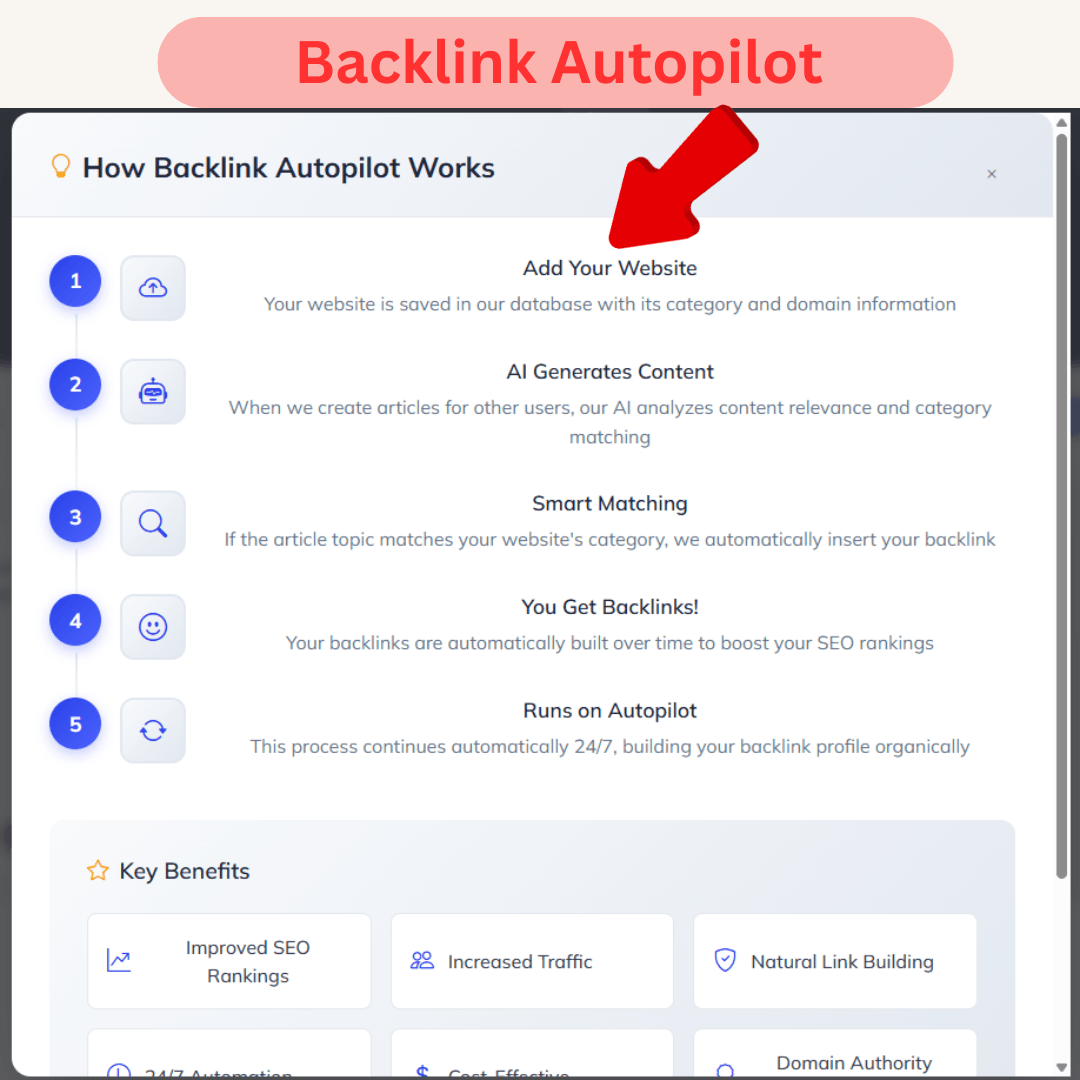
⭐ Special Feature: Backlink Autopilot
Boost Your SEO Automatically
Writecream’s Backlink Autopilot lets you submit your website URL and category. When other users generate content that aligns with your category, your site is automatically linked in their article. This results in:
✅ Natural link building
✅ Increased organic traffic
✅ Improved domain authority over time
✅ Hands-free SEO gains
This is one of the most unique features that sets Writecream apart from other AI content generators.
Exploring Writecream's Arsenal of Tools
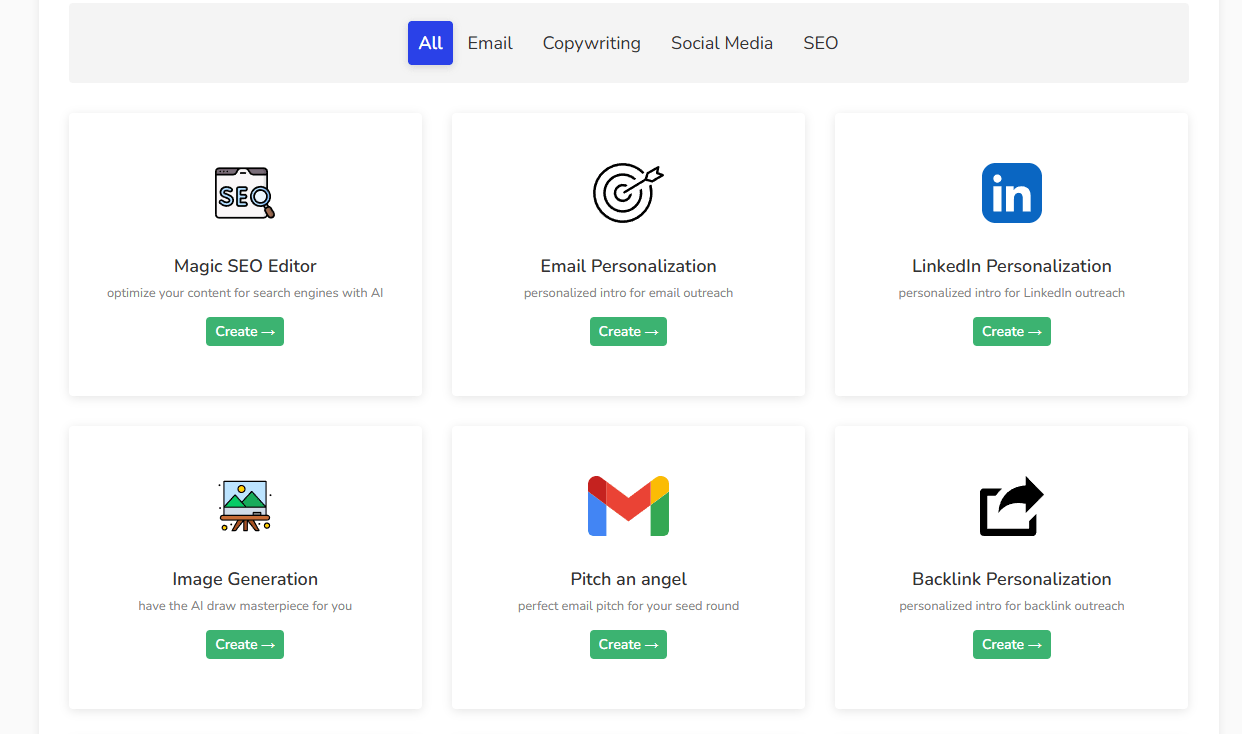
A closer look at how I used Writecream's features beyond blog generation
Article & Blog Tools
Helped me generate outlines, titles, blog conclusions, and meta descriptions very fast and efficiently.
Ideal for building the first draft skeleton of my article before editing and adding my own touch.
SEO Tools
Gave me keyword ideas, competitor analytics, and insights to optimize content for ranking
I used the SEO Hub to refine articles with better-targeted keywords.
Long-Form Generator
This is where the writing happens — a complete article with H1, H2, and H3 structure generated in just a few clicks
Saved me time outlining and planning; I just had to edit and add my voice
Social & Ad Copy Tools
I created catchy social media captions, Facebook ads, Google ad copy, and even product reviews with minimal input
Particularly useful when I needed quick, creative snippets for engagement
Chat Genie (Built-in AI Assistant)
Functions like ChatGPT inside Writecream
I used it for blog brainstorming, translating articles, and playing with different tones
Helped answer questions and speed up ideation when I hit creative blocks
Cold Emails & Audio Icebreakers
Great for outreach — Writecream generated personalized cold emails and audio icebreakers that added a human touch
Perfect for anyone doing email marketing or client engagement
Onboarding & User Experience
Getting started with Writecream is quick and easy. You can sign up with just your name and email, and you’ll be inside the dashboard in seconds—no credit card required.
Once inside, the interface is clean and beginner-friendly. You can jump straight into creating content using the Long-Form Editor, Chat Genie, or SEO tools without much of a learning curve.
That said, Writecream currently doesn’t offer video tutorials or a dedicated FAQ section for self-service troubleshooting. However, their customer service more than makes up for it.
There's a chat button conveniently located at the bottom right corner of the page, and in my experience, they've consistently replied to my questions within 24 hours.
Performance & My Real Experience with Writecream
My experience with Writecream was mostly positive. I used it to write a blog article on habit building.
Testing Writecream's Blog Article Generator
Blog Outline Generation: Took about 1 minute
Paragraph Generation: Took 4 minutes initially, then failed.
Retry Generation: After a failed attempt due to a glitch, the full article was generated in 2 minutes using the one-click method.
How Good Is Writecream for SEO and AI Content Generation?
⏱️ Total time: About 7 minutes (including a brief glitch and retry)
✅ What it generated:
Full blog draft
Keyword suggestions
SEO checklist
Headline outlines
SEO score
🎯 All done within the same workflow
⚠️ Image Generator Caveat:
Struggled with spelling and clarity, especially for infographics
May require cleanup in external tools like Canva

Using Writecream to Generate Product Descriptions and Social Media Copies
Using Writecream, I was able to:
Quickly generate blog articles with a clean H1, H2, and H3 structure.
Create personalized icebreakers and cold email templates.
Generate social media captions and content tailored for engagement.
Pros and Cons of Writecream AI Content Generator Tool
| ✅ Pros | ⚠️ Cons |
|---|---|
| All-in-one content creation platform | No one-click grammar/plagiarism check |
| Cost-effective with generous free/lifetime options | AI image generator needs improvement |
| Fast, helpful customer support | No live word count or auto image insertion |
| Excellent social media and SEO tools | Missing tutorials, FAQs, and privacy policy |
| Supports 75+ languages | SEO and image tools require extra manual input |
✅ What I Love About Writecream
✅ All-in-one content creation: blog writing, images, SEO, and captions
✅ Very cost-effective — especially with AppSumo lifetime deal
✅ Friendly and fast customer service, even on weekends
✅ Dashboard includes access to nearly all tools in one place
✅ Customizable document outline with H1, H2 headings
✅ Valuable SEO data, including keyword insights and user intent
✅ Excellent social media caption generation without needing custom prompts
✅ Supports over 75 languages and outputs adapt to your selection
✅ Ability to generate personalized email content and audio icebreakers quickly
✅ Chat Genie allows you to translate, ideate, and produce original content in multiple languages
✅ Built-in progress bar shows if the word count is sufficient to create high-quality content.
⚠️ Where Writecream Could Be Better
❌ No one-click grammar/plagiarism check, you must copy-paste into separate tools
❌ AI image generator often returns misspelled or odd results
❌ No live word count shown, only a progress bar for blog sufficiency
❌ Infographic quality is unreliable and requires extra cleanup on other sites like Canva.com.
❌ No automated image insertion into blog drafts
❌ No FAQ, usage tutorials, or instructional videos for onboarding
❌ No visible data security or privacy disclaimers found on the website
❌ SEO and image tools can slow down workflow due to manual integration
❌ Limited control over how many words are generated in the long-form editor
Writecream Pricing
On the Writecream website, you can:
Use the Free Tier (40,000 characters/month)
Upgrade to $9/month for full access
I'm using the Writecream Lifetime Deal from AppSumo, which includes:
250 AI credits
500,000 characters per month
500 AI images per month
500 domain analyses per month
500 keyword research queries per month
50 SEO content analysis queries per month
Access to all content templates
Support for 75+ languages
1 website for Backlink Autopilot
1 team member account
Is the Writecream Monthly Plan Worth It?
Writecream offers more value than most:
Replaces tools like ChatGPT, Grammarly, and Midjourney, if pay separately, the cost quickly adds up to >$9/month.
No need to pay for a separate AI content writer, AI writing assistant, image tools, or grammar checkers
How Writecream Compare to Competitors
📝 Tool Comparison Breakdown
🟢 Writecream
The most well-rounded option for content creators who want AI tools for blog writing, cold emails, social media, SEO, and even image generation. Great for non-techies and solo bloggers who want everything in one place.🟡 WordHero
A fast and efficient AI writer. Best for quick drafts, but it lacks the SEO depth or keyword tools that serious content marketers might need.🟡 Quick Creator
Excellent if you want to generate a full blog with images and publish directly to WordPress. However, it offers limited customization, so you trade control for speed.🟠 NeuronWriter
Best for advanced SEO users. It dives deep into SERP analysis and content scoring but may be overwhelming or unnecessary for casual bloggers or beginners.🟡 Writeseed
Great for structured article generation with prebuilt prompts and templates. However, it’s more rigid, so you may find it limiting if your content needs a more creative or custom voice.
💰 Pricing Comparison
Here's how Writecream compares in terms of pricing and features:
| Tool | Monthly Cost | Strengths | Limitations |
|---|---|---|---|
| Writecream | $9 or Lifetime Deal | All-in-one platform, SEO, Chatbot, AI Images | Manual checks, basic image generation |
| NeuronWriter | $23 | Strong SEO-focused writing | Less user-friendly, higher learning curve |
| WordHero | $49 | Quick content generation | Lacks SEO depth, higher price |
| Quick Creator | $39 | One-click blog generation with images | Less flexible editing |
| WriteSeed | $15 | Prebuilt prompts and SEO-focused templates | Fewer integrations |
Security & Privacy:
🔒 Data Security
As of this review, Writecream does not display clear information about data security protocols or encryption standards on its website. This might be a concern for users handling sensitive or proprietary content. If data security is critical to your workflow, consider reaching out to Writecream’s customer support (which is very responsive) to inquire directly about their security policies.
🛡️ Privacy
There is also no clearly stated privacy policy or GDPR compliance notice visible during sign-up or in the footer. While Writecream doesn’t appear to misuse content, transparency on how your data is stored, processed, or used could be improved.
💬 Customer Support & User Feedback
Customer Support
✅ Live chat available at the bottom right of the site — no email required
✅ Fast response times based on my experience:
Technical issue: reply within 3 hours
Language translation question: reply in under 24 hours (on a weekend!)
⚠️ No FAQ section, onboarding tutorials, or community forums yet
User Reviews & Testimonials
⭐ Positive reviews on Writecream’s sign-up page and AppSumo listing
👍 Praised for affordability and wide feature set
⚠️ Common complaints:
Some AI content lacks depth on niche topics
Output quality in non-English languages varies
📢 Most feedback is favorable — especially among bloggers, freelancers, and non-tech-savvy users looking for an affordable, all-in-one AI tool.
Pros:
✅ Affordable all-in-one AI content generator with blog, image, SEO, and email tools
✅ Chat Genie provides built-in chat assistance, no need for ChatGPT subscription
✅ Offers lifetime deal and generous free plan for light users
✅ Supports over 75 languages, making it accessible for international users
✅ Tools cover content creation, SEO, cold emails, ad copies, and product reviews
✅ Responsive customer service with easy access via live chat
✅ Helps streamline the entire content workflow in one platform
Cons:
❌ No one-click grammar or plagiarism checker integration
❌ AI-generated infographics may require cleanup in external tools like Canva
❌ No built-in image insertion for blog articles — must be done manually
❌ Lacks onboarding tutorials or FAQ section for first-time users
❌ SEO and image tools add extra steps to blog creation
Final thoughts?
Writecream isn’t perfect, but it’s a solid, budget-friendly content creation toolkit for bloggers, solopreneurs, educators, and marketers. If you want to create content fast without juggling multiple subscriptions — and you’re okay doing a little polishing yourself — Writecream is a great choice. ✍️💡
💡 Final Verdict:
Should Content Creators Use Writecream AI for Writing and Personalization?
✅ Yes, if you want an AI tool that can generate cold emails, blog articles, social content, and more — without needing 5 different subscriptions.
✅ Writecream supports 75 languages, offers cold email icebreakers, product review templates, and tools to personalize content faster.
❌ Skip it if you rely heavily on infographics or need automated plagiarism detection.
But overall?
Writecream is one of the many AI writing assistant contenders for those of us who want to generate content quickly and affordably.
Ready to Try Writecream?
Whether you're a blogger, marketer, or small business owner, Writecream may become your go-to writing assistant.
💬 Have questions about using Writecream or want to share your own experience? Drop them in the comments — I'd love to hear what you're creating with AI!
Writecream Review: Can This AI Content Generator Replace Your Writing Tools?
© JustSimpleInsight.com